BigQuery
Export semantic datasets and replicated source tables into Google BigQuery with backend-owned table and schema planning.
Browse every registered connector, then open a connector to inspect its available datasets, report schemas, provider fields, Meridian mappings, and data types.
Send governed Meridian datasets into warehouses, lakehouses, object storage, spreadsheets, BI tools, and built-in Meridian analysis surfaces.
Export semantic datasets and replicated source tables into Google BigQuery with backend-owned table and schema planning.
Load governed exports into Snowflake databases and schemas using key-pair credentials and validated write modes.
Send period-safe semantic exports to Redshift tables through staged Parquet loading and customer IAM role access.
Stage semantic exports into Databricks SQL and Delta workflows with service-principal authentication.
Export modeled datasets into OneLake and Fabric Lakehouse tables through service-principal credentials.
Replace selected spreadsheet ranges with semantic exports for recurring team reporting and lightweight analysis.
Use spreadsheet-ready exported datasets in Excel workflows when teams need offline review or workbook handoff.
Expose saved Meridian semantic exports to Looker Studio through the Meridian connector surface.
Push backend-compiled semantic exports into Power BI datasets with service-principal authentication.
Write JSON Lines exports to customer-owned S3 prefixes using cross-account IAM role access.
Deliver JSON Lines exports to GCS buckets with destination credentials stored outside export configs.
Export JSON Lines datasets to Azure Blob Storage or ADLS Gen2 with Entra ID service-principal auth.
Use built-in dashboards powered by the same governed semantic layer used by exports.
Inspect fields, validate data, and explore modeled datasets inside Meridian before sending them downstream.
Metric Hive's Marketing Data Hub is the operating layer between source APIs and the places teams work. It collects provider data, preserves lineage, normalizes fields into governed semantic datasets, monitors trust signals, and exports modeled data to dashboards, spreadsheets, BI, and warehouses.
Connectors fetch source reports through governed credential, ingestion, interval, and source-state flows, then land the data with tenant, account, source, and date boundaries intact.
The hub maps provider fields into approved semantic datasets, including ad performance, web analytics, CRM, payments, ecommerce, product-ad performance, and source metadata.
Explore, dashboards, transformations, Data Health, spreadsheets, BI connectors, and warehouse exports all use the same backend-owned contracts and compatibility guardrails.
The Marketing Data Hub is not another reporting template. It is the shared data foundation that keeps connector ingestion, lake tables, semantic query datasets, transformations, monitoring, and exports aligned.
Raw connector fields only become useful when the system understands what they mean. Metric Hive maps platform data into canonical entities, grains, dimensions, metrics, date rules, currency behavior, and table contracts so every dashboard, export, and analysis starts from the same decision-ready model.
Connectors read provider reports with their source scope, timestamps, currencies, identifiers, and coverage decisions, then preserve enough lineage for audit and troubleshooting.
The semantic contract decides each field's canonical entity, base grain, role, aggregation behavior, additivity, visibility, and export policy before users can query it.
Dashboards, Explore, spreadsheets, BI, and data-warehouse exports all use the same contracts, so decisions are made from the same model wherever the data goes.
Metric Hive is built with the semantic layer at its core. It keeps connector ingestion, lake tables, query datasets, exports, and app surfaces aligned around the same business meaning.
Metric Hive turns Commerce Intelligence profit data into a pricing and promotion review system. It monitors product prices, realized selling price, discounts, returns, inventory, cost rules, and contribution margin so ecommerce teams can find where to protect margin before they change prices, launch promotions, or increase campaign spend.
The system verifies product catalog, variant or SKU coverage, order lines, discount evidence, COGS or cost rules, refunds, returns, inventory, freshness, and currency policy before showing recommendations.
Commerce Intelligence evaluates realized selling price, gross revenue, net revenue, discount rate, COGS, gross margin, contribution margin, return impact, and ad spend context where available.
Recommendation queues can suggest price review, promo review, discount suppression, margin guardrails, campaign exclusions, or clearance review, but decisions remain manual and do not publish price changes.
Pricing Optimization is a Commerce Intelligence add-on. It helps operators, finance, merchandising, and performance marketing teams inspect the economics behind product prices and promotions without rebuilding margin spreadsheets.
Metric Hive Measurement brings MMM, MTA, and triangulation into the same semantic layer that powers your modeled marketing and commerce data. Every result starts with backend-owned readiness checks for scope, outcome trust, media or touchpoint coverage, currency behavior, diagnostics, and publishing status.
Measurement uses an account or default market scope with timezone, currency, week start, date range, outcome source, and versioned assumptions attached to durable outputs.
Readiness verifies outcome history, media spend, touchpoint events, conversion provenance, privacy-safe bridge quality, history depth, and currency safety before results are produced.
Results can be blocked, directional, or publishable. Trusted surfaces require diagnostics, safe metadata, and publish/sign-off state before outputs are treated as customer-visible evidence.
The product family is organized around method modules and a shared readiness contract, so MMM and MTA do not invent separate data assumptions for the same business question.
Metric Hive turns Shopify catalog data, inventory evidence, Google Merchant Center diagnostics, and semantic product tables into feed readiness checks, priority issue groups, preview rows, and safe exports. The first version is built for Google Shopping diagnostics and export-ready product data without mutating Merchant Center.
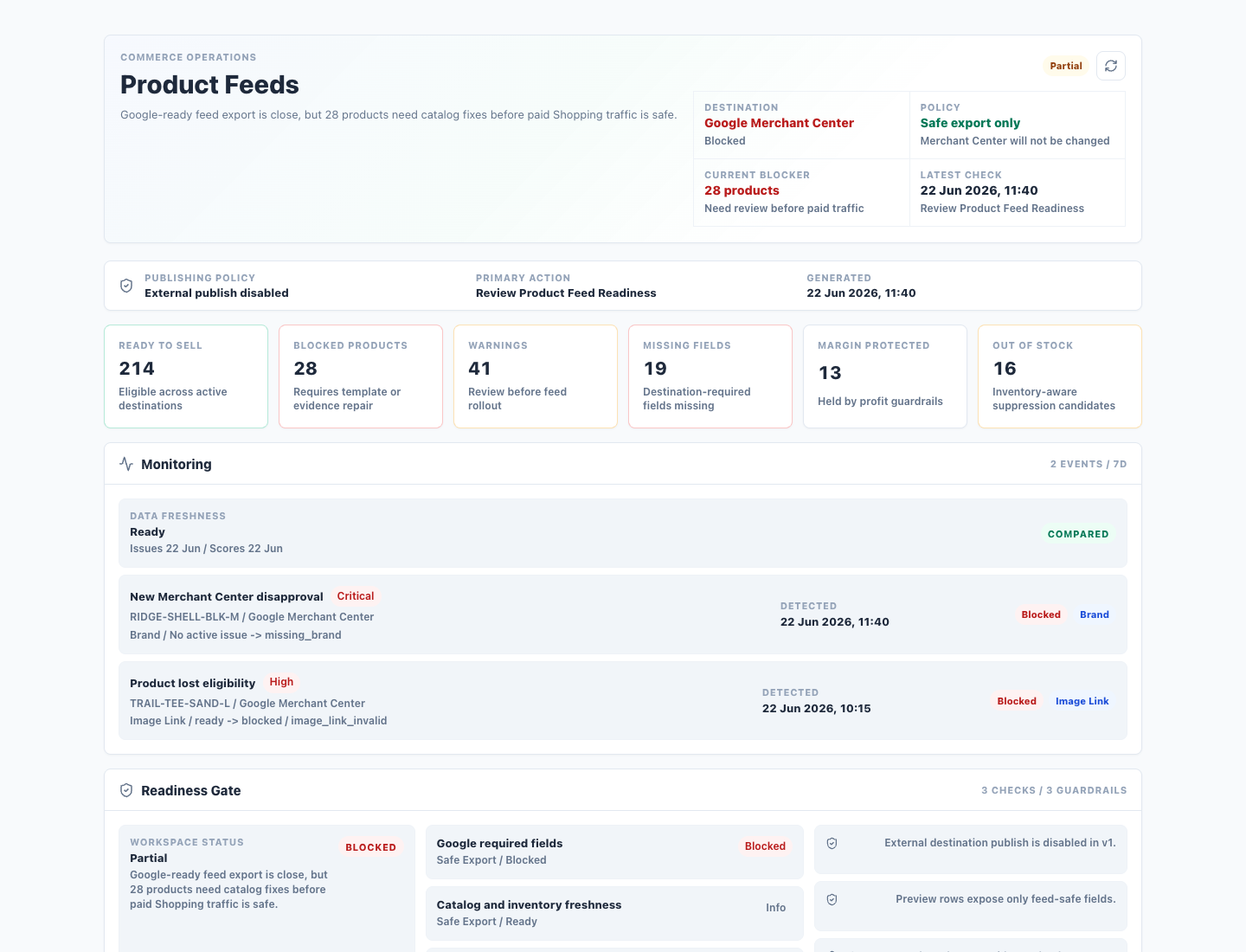
Shopify provides product, variant, price, image, and inventory context. Google Merchant Center issue data adds provider-side diagnostics when it is connected.
The backend checks destination requirements, product identity, freshness, missing fields, provider issues, inventory risk, and export policy before a row is considered usable.
Teams get issue groups, deterministic recommendations, trust receipts, feed previews, CSV downloads, and modeled exports while external platform publishing stays disabled in v1.
Product Catalog Optimization is a feed intelligence layer, not a PIM replacement. It helps teams understand which products are ready for paid shopping channels, which products are blocked, and what evidence explains the decision.
Commerce Intelligence turns ecommerce orders, order lines, product catalog, COGS, payment fees, refunds, returns, shipping, fulfillment, inventory, marketing context, and currency policy into governed profit datasets. The result is not another revenue dashboard. It is a traceable commerce model that shows where margin is created, where it leaks, and which outputs are safe to use.
Metric Hive keeps orders, products, payments, costs, refunds, returns, inventory, web events, marketing touchpoints, and source provenance scoped to the correct account, shop, currency, and date grain.
The modeled layer applies cost rules, product identity, payment bridges, validation checks, and currency policy so gross revenue can become net revenue, gross profit, and contribution margin without unsafe joins.
Dashboards, Explore, exports, BI, and other intelligence modules use the same approved datasets, and later modules remain gated when evidence is stale, missing, zero-row, or not launch-ready.
Commerce Intelligence is the profit truth layer for Metric Hive. It gives marketing, finance, ecommerce, and data teams a shared model for decisions that should not be made from revenue or platform ROAS alone.
Product description placeholder.
Meridian connects marketing, CRM, payment, and ecommerce data, stores it, maps it into common business fields, and sends it where your team works. No-code for marketers. Programmable workflows for technical teams.
Pay monthly for what you use: 4 data sources + Google Sheets export one month, 100 sources + BigQuery the next. For commerce teams, the modeled layer separates customer-paid shipping revenue, merchant shipping costs, gateway fees, and retroactive return adjustments so profit reporting does not collapse into generic dashboard math.
Meridian stores your source data, shapes it into shared business definitions, and keeps it ready for dashboards, exports, and automation. Commerce models preserve the difference between what customers paid for shipping, what the merchant paid to fulfill it, transaction fees, and late return adjustments.
Bring in marketing, CRM, payment, ecommerce, and analytics data. Keep source data stored so reporting is fast and repeatable.
Map platform-specific fields into common business fields. Create custom dimensions and metrics for your own reporting logic.
Explore data in Meridian, export it to your tools, and automate supported workflows through API and MCP.
Meridian keeps source detail available while giving your team common fields for reporting. Build shared definitions once, then use them in dashboards, exports, and automated workflows.
| Source | Native field | Value |
|---|---|---|
| Meta Ads | spend | 420.13 |
| Google Ads | cost_micros | 391200000 |
| LinkedIn Ads | amountSpent | 82.44 |
| Common field | Value |
|---|---|
| cost | 893.77 |
| shipping_amount | 12.00 |
| shipping_cost_amount | 10.00 |
| payment_fee_amount | 11.00 |
| refund_amount | 50.00 |
| return_cost_amount | 4.00 |
| currency | USD |
| date | 2026-05-01 |
| channel | Paid social / Paid search |
The same data model powers the UI, exports, and programmable workflows, so marketers and technical teams can work from one shared foundation.
Use Dashboards and Data Explorer, export to spreadsheets and BI tools, and sync clean datasets to your warehouse destinations.
Your bill changes when you connect more data or add exports, not when someone needs another seat or a team wants to use a product feature.
Connect a source, normalize the fields that matter, and send business-ready data to the tools your team already uses.